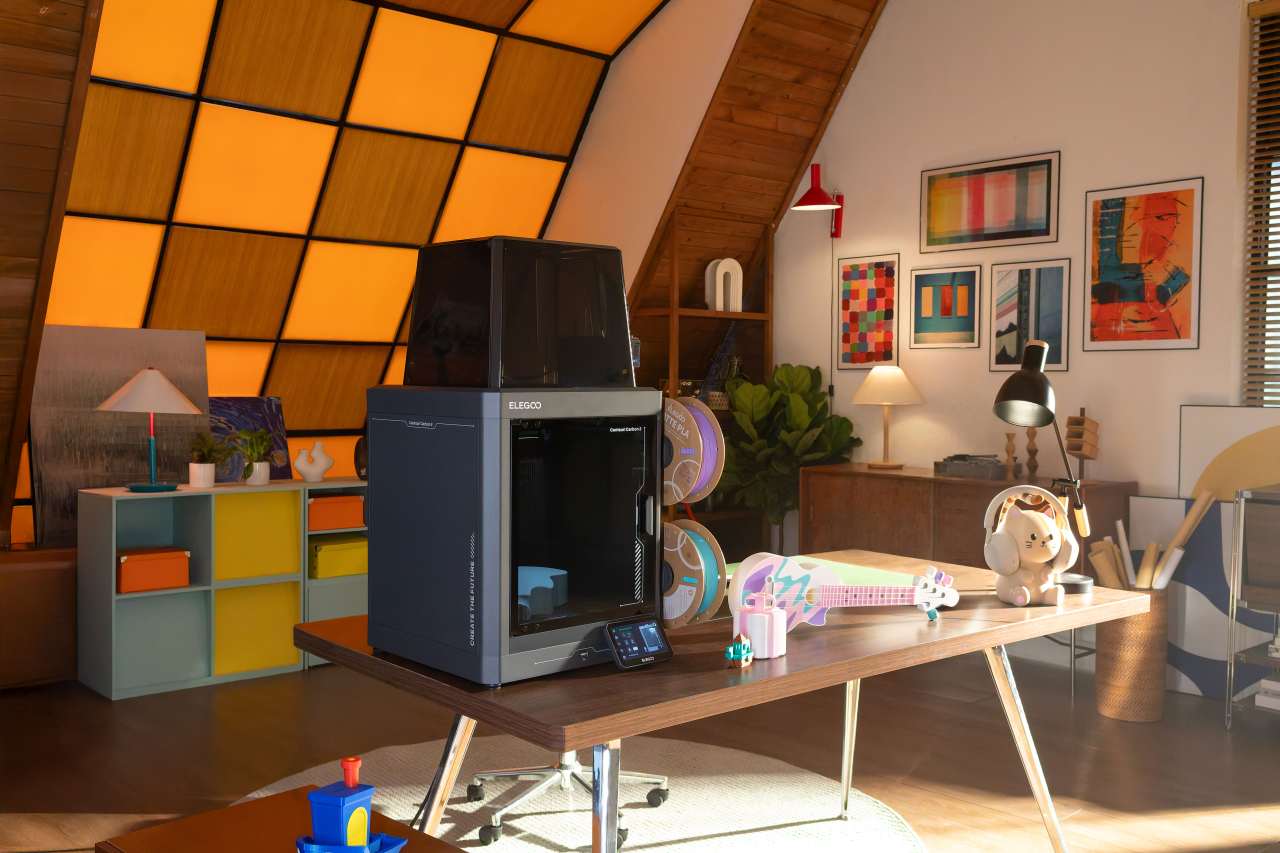
When a manufacturer manages to pull multicolor 3D printing out of the premium niche and push it into a price range normally dominated by solid entry-level machines, it’s worth paying attention. That’s precisely what Elegoo is attempting in early 2026 with the Centauri Carbon 2 Combo.
On paper, the Centauri Carbon 2 Combo looks like a machine designed to blur boundaries: a CoreXY FDM 3D printer, a multicolor system capable of handling up to four filaments, high-temperature hardware, and a strong focus on automation and usability. And all of that lands in a price segment that, until recently, had little to do with multicolor printing at all.
This article is not a hands-on review and not a long-term test report. Instead, it’s a technical overview and market analysis of what the Centauri Carbon 2 Combo brings to the table, what it realistically enables, and where its natural limits are.
What the Centauri Carbon 2 Combo Actually Is
At its core, the Centauri Carbon 2 Combo is a CoreXY-based FDM 3D printer. CoreXY mechanics are well known for their ability to move the print head quickly and precisely by distributing mass more efficiently than traditional Cartesian systems. This design choice is one of the reasons CoreXY printers dominate the “speed printer” category.

Elegoo specifies print speeds of up to 500 mm/s with accelerations reaching 20,000 mm/s². As always, these are peak figures. Real-world results depend heavily on material choice, part geometry, layer height, and desired surface quality. Still, these numbers clearly position the Carbon 2 Combo closer to modern high-speed printers than to classic beginner machines.
The “Combo” designation is crucial. It indicates the inclusion of Elegoo’s CANVAS multicolor system, which manages up to four filaments and performs automatic filament switching during a print job. In practical terms, this means multicolor prints without manual intervention.
CANVAS: Multicolor Printing Without the Circus
Multicolor printing has traditionally been associated with complexity, tuning overhead, and frequent failures. With CANVAS, Elegoo aims to reduce that friction as much as possible.
According to official specifications and early reports, the system includes smart filament detection, automatic refill handling, and tangle detection. These features are designed to catch common failure scenarios such as empty spools or tangled filament before they ruin long print jobs.
Another noteworthy detail is RFID-based filament recognition, primarily intended for Elegoo-branded filaments. RFID allows the printer to automatically identify material parameters and load suitable profiles. As with similar systems from other manufacturers, this is best understood as a convenience feature rather than a hard requirement. Manual filament configuration remains possible, especially for users who rely on third-party materials.
One unavoidable aspect of multicolor printing is purge waste. Every color change requires flushing the previous filament from the nozzle. The Centauri Carbon 2 Combo does not change the physics of this process. While modern systems can minimize waste through smarter purge strategies, material loss during color changes remains part of the trade-off for multicolor capability.
High Temperatures and the “Carbon” Promise
One of the most striking specifications of the Centauri Carbon 2 Combo is its maximum nozzle temperature of up to 350 °C, paired with a hardened nozzle. This goes well beyond what is typical in entry-level or mid-range machines.
In practice, this does not automatically turn the printer into an industrial-grade nylon workstation. However, it significantly expands the usable material range beyond standard PLA and PETG. Flexible materials like TPU and more demanding filaments become realistic options, provided the rest of the setup supports them.
This is where the enclosed build chamber comes into play. Elegoo advertises a closed enclosure combined with a smart temperature management system, referred to as a Smart Grille. While manufacturers differ in how actively they heat and regulate chamber temperatures, an enclosed environment alone already reduces warping risks and improves layer consistency on larger or more demanding prints.
Automation and Sensors: Moving Toward an Appliance Experience

Elegoo promotes the Carbon 2 Combo with claims of full automatic calibration and 31 onboard sensors for intelligent detection. While the exact distribution of these sensors is not fully detailed, the direction is clear.
Modern 3D printers are increasingly designed to behave less like tinkering projects and more like appliances. Automatic bed leveling, filament monitoring, error detection, and self-check routines all serve one goal: reducing friction between the user and the finished print.
This is especially important for multicolor systems. Without reliable automation and monitoring, filament switching can quickly become the weakest link in a complex setup.
Noise Levels and Everyday Usability
Elegoo states that the Centauri Carbon 2 Combo can operate at below 45 dB, positioning it as a relatively quiet machine. Actual perceived noise will always depend on print speed, fan profiles, resonance from the surface it stands on, and room acoustics.
Still, the emphasis on low noise is telling. Many users no longer keep their printers isolated in workshops. Home offices, living spaces, and shared rooms are increasingly common locations. For multicolor prints that can easily run for many hours, noise becomes more than a minor detail.
Build Volume: A Practical Sweet Spot
With a build volume of 256 × 256 × 256 mm, the Carbon 2 Combo sits in a size class that works well for most maker projects. It’s large enough for functional parts, enclosures, decorative objects, segmented cosplay components, and board game accessories, while remaining compact enough to qualify as a desktop printer.
This balance makes it suitable for a wide range of use cases without demanding a dedicated room or heavy reorganization.
Software and Workflow
Elegoo relies on ElegooSlicer, which is based on OrcaSlicer. OrcaSlicer has gained popularity for its advanced tuning options, speed optimization features, and strong support for multicolor and multi-material workflows.
For multicolor printing in particular, software quality is critical. Color assignment, purge control, material profiles, preview accuracy, and realistic time estimates all influence the final experience. Building on an established slicer foundation reduces friction and shortens the learning curve for new users.
Pricing and Market Impact
In Europe, the Centauri Carbon 2 Combo is listed at around €439, while US listings reference $449. This pricing places it squarely in what can be described as the budget multicolor CoreXY segment.
That positioning matters. By bringing multicolor printing into this price range, Elegoo applies pressure to significantly more expensive systems and reshapes expectations for what “entry-level” can mean in 2026.
For users, this translates into optional complexity rather than mandatory luxury. Multicolor printing becomes something you can choose when it adds value, rather than a feature reserved for high-end machines only.
Realistic Expectations Without the Hype
The Centauri Carbon 2 Combo appears carefully optimized in three key areas: multicolor convenience through CANVAS, material flexibility through high-temperature hardware and enclosure design, and day-to-day usability through automation and sensor-driven monitoring.
At the same time, multicolor printing remains inherently slower and more material-intensive than single-color jobs. Successful results still depend on good profiles, dry filament, and a sensible workflow.
Accepting those realities, the Centauri Carbon 2 Combo stands as a strong signal that 2026 may be the year multicolor printing truly enters the mainstream maker space, no longer limited to enthusiasts willing to pay premium prices.